Repurposing one long recording into multiple shorter videos is now a standard part of any real content and SEO strategy. Each clip is a separate opportunity to rank, to get discovered on a different platform, and to target a different search query built around the same core content. The question is which tool actually gets you from one long video to several usable, search-ready clips more effectively: OpusClip, built specifically around this task, or Invideo Editor, which approaches the same outcome from an assembly-first angle.
The difference comes down to how each tool decides what becomes a clip and how much control creators have over the final output. While one focuses on automatically finding high-performing moments, the other gives teams more direction over how content is structured for specific audiences and search goals.
Here is how the two actually compare.
What Invideo Editor is built to do
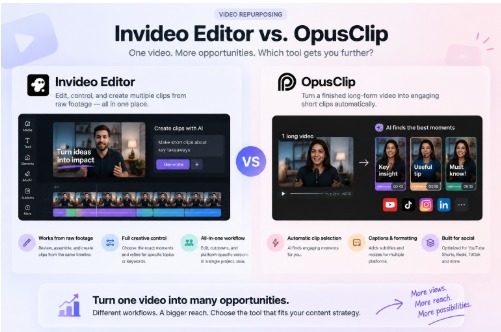
Invideo editor approaches content repurposing differently. Instead of starting with a finished long-form video and pulling clips afterward, it works from raw footage first, reviewing the material, assembling a base cut, and supporting cut-downs and versioning from the same project timeline.
For teams managing multiple content formats, editing video with AI helps make repurposing more controlled. Creators can describe the sections they want, refine the results, and create platform-specific versions from the same timeline instead of relying only on engagement signals to decide what gets turned into clips. This keeps the creative decisions with the person directing the edit.
Strengths: genuinely useful for teams that want control over which moments become clips, since the direction is topic- and content-based rather than engagement-scored. The output stays on a full editable timeline, so a clip can be refined for a specific keyword or query rather than accepted as generated.
Limitations: requires a direction, describing which section or topic should become a clip, rather than fully automatic surfacing the way OpusClip's engagement-based selection works.
What OpusClip is built to do
OpusClip's entire pitch is long-form to clips. Upload a finished long-form video, podcast episode, webinar, or YouTube upload, and it analyses the footage to automatically surface shorter segments it identifies as engaging, then adds captions and formats them for platforms like YouTube Shorts, Instagram Reels, and TikTok.
Strengths: genuinely fast at surfacing candidate clips without manual scrubbing. Captioning and platform formatting are handled automatically, which saves real time on the repurposing side specifically.
Limitations: it requires a finished long-form video as a starting point. It does not help build that original long-form video, and the clips it surfaces are selected for general engagement scoring rather than search intent, so a segment that performs well on watch time is not necessarily the segment that targets a specific query a content team is trying to rank for.
Where the two actually differ
The real difference is not speed alone; both tools move quickly, but it is what decides which moments become clips. OpusClip optimises for what is likely to hold attention. Invideo Editor optimises for what the person directing the edit actually wants highlighted, which matters specifically for search-ready content, since the clip that performs best on completion rate is not always the clip built around the query a business wants to rank for.
For a content team building clips purely to maximise social engagement, OpusClip's automatic surfacing does exactly what it is built for. For team-building clips as part of a deliberate multi-channel SEO strategy, where each clip needs to target a specific topic, keyword, or search intent, the ability to direct which section becomes which clip matters more than automatic selection.
Which one fits a search-driven content strategy
If the goal is repurposing an already finished long-form video quickly with minimal input, OpusClip remains the more purpose-built option for that narrow task. If the goal is producing both the original long-form video and a set of clips deliberately built around specific topics or search terms, Invideo Editor covers more of that workflow in one place, from raw footage to the final set of versions.
For teams treating clip repurposing as an SEO channel rather than just a social content habit, that difference in control over what each clip is actually built around tends to matter more than raw processing speed.
Frequently Asked Questions
Can Invideo Editor pull clips from an already finished long-form video, like OpusClip does?
Yes, through its cut downs and versioning capability, though the process is direction-based, describing which section should become a clip, rather than fully automatic.
Is OpusClip better for teams that just want quick social clips without much input?
Generally yes, since its automatic engagement-based selection requires minimal direction and is specifically built around that use case.
Which tool gives more control over what a clip is actually about?
Invideo Editor, since clips are built from a described direction rather than an engagement score, which matters when a clip needs to target a specific topic or search query.
Can both tools be used together in the same workflow?
In practice, some teams use Invideo Editor to build and structure the original long-form content, then apply a tool like OpusClip afterward for a second pass focused purely on social engagement clips.