Color grading is often the step that separates a video that looks intentional from one that looks unfinished. It is also the step most content teams skip entirely, not because it does not matter, but because the tools built for it were designed for people who grade color for a living. That gap is worth understanding before choosing a workflow for a team that needs consistent, on-brand video without hiring a colorist to get there. As video production becomes more frequent across marketing, social media, and brand communication, maintaining a consistent visual style becomes harder with manual workflows alone. The right color grading approach can help teams improve quality while keeping the editing process efficient and repeatable.
What Color Grading Actually Solves
Every camera, every lighting setup, and every recording session produces footage with slightly different exposure and color balance. Left uncorrected, a video shot across multiple sessions looks inconsistent, one clip too warm, another too dark, none of it matching the brand's visual identity. Color grading fixes that. It corrects exposure, balances color, and shapes a consistent look across every clip in a project.
The problem is that grading has traditionally required a steep learning curve. Understanding scopes, nodes, and color theory takes real time to learn, and most content teams do not have someone on staff whose job is specifically that.
Invideo Editor: Grading Through Direction, Not Manual Adjustment
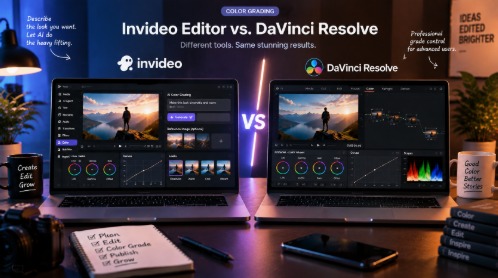
Invideo editor takes a fundamentally different approach to color work than most editing software. Instead of asking a person to manually adjust every wheel and curve, you describe the look you want to an AI agent or share a reference image and let the agent match it. The agent applies the grade, and you can then fine-tune it further using color wheels, curves, and manual controls if you want more precision.
This changes what grading actually feels like in practice. A creator working inside Invideo Editor can upload a clip, describe something like a warmer, more cinematic tone, or point to a reference image from a brand's existing content, and get a starting grade back almost immediately. From there, the manual tools are still fully available; nothing about the AI-assisted step locks you out of precise, hands-on adjustment.
This is where invidio's color grading becomes the more practical starting point for a content team. Rather than requiring someone to learn color theory before they can produce a consistent-looking video, the agent handles the technical correction first, exposure balance, white balance, matching footage shot in different conditions, and the person directing it focuses on describing the result they want rather than executing it manually. For a team publishing regularly, that is the difference between grading being a bottleneck and grading being a normal part of the process.
The experience holds up even on footage that was not shot under ideal conditions. Clips recorded in mixed lighting, across different devices, or during separate sessions can be brought into a single, coherent look without someone manually matching each one by eye. That consistency is exactly what a content team publishing across multiple videos actually needs, not the deepest possible color science, but a fast, reliable way to make everything look like it belongs together.
DaVinci Resolve: Deep Control, Built for a Different User
DaVinci Resolve is the industry standard for color grading, and its reputation is earned. The node-based system gives a trained colorist an extraordinary level of control, primary and secondary corrections, power windows, qualifiers, and scopes for precise technical accuracy. For a feature film or a project with a dedicated colorist on the team, that depth is genuinely valuable.
The tradeoff is accessibility. Resolve's grading tools assume the person using them already understands color theory, node structures, and how to read a waveform or vectorscope. There is no equivalent to describing a look in plain language and getting a starting grade back. Every adjustment is manual, which means every adjustment also requires the knowledge to make it correctly.
For a content or marketing team without a colorist, that learning curve becomes the real cost. The software itself is capable of extraordinary results, but getting there requires either significant time invested in learning the tool or a specialist brought in specifically for that step. Neither is realistic for a team that needs to publish video regularly without color grading turning into its own separate project.
Which Workflow Actually Fits a Content Team
The honest comparison is not about which tool has more powerful grading tools in the hands of an expert. Resolve wins that comparison, and it is not close. The real question is which workflow fits a team that needs consistent, professional-looking video without a colorist on staff, and needs it without every video becoming a multi-hour grading exercise.
Invideo Editor is built for that gap specifically. Describing a look and refining it afterward is a workflow a content creator or marketer can actually use without months of learning color theory first. Resolve is built for teams that already have that expertise or are willing to invest in developing it. Most content teams publishing on a regular schedule fall into the first category, not the second.
The Bottom Line
Color grading matters more than most content teams treat it, and the tool a team chooses should match how that team actually works, not how a feature film production works. For a team without a dedicated colorist, Invideo Editor offers a workflow that gets to a consistent, intentional look quickly, with manual controls still available for anyone who wants to push further. DaVinci Resolve remains the deeper tool for those who already have the expertise to use it, but that depth is only an advantage if someone on the team knows how to use it well.
Frequently Asked Questions
Do I need color grading experience to use Invideo Editor's grading tools?
No. The AI agent can apply a grade based on a plain-language description or a reference image, and the manual color wheels and curves remain available for anyone who wants finer control afterward.
Can Invideo Editor match footage shot in different lighting conditions?
Yes. Describing the desired look or sharing a reference image helps bring footage from different sessions or devices into a more consistent, unified tone.
Is DaVinci Resolve better for someone who already knows color grading?
For a trained colorist, Resolve's node-based system offers deeper manual control. The tradeoff is that this depth requires existing expertise to use effectively.
Which tool is better for a content team without a dedicated colorist?
A workflow built around plain-language direction, like Invideo Editor's, is generally more practical for teams that need consistent results without first learning color theory.