Long-form content rarely gets published in the shape it was recorded in. A podcast episode, a screen-recorded tutorial, and a raw interview all of it needs to go through an editing pass before it becomes a video worth putting on YouTube. The question most content teams actually care about is not which tool has the most features. It is which tool gets you from raw material to a publishable video the fastest, without sacrificing the ability to fix things afterward.
Here are five AI-native video editors compared specifically on that basis, speed from raw script or footage to a video ready to publish.
What actually matters for this comparison
Before ranking anything, it is worth being clear about what "fast" means in a real content operation.
- How much of the raw footage review happens automatically, since manually watching and marking a long recording is where most editing time actually goes.
- How well the tool handles unscripted or messy footage, since long-form content rarely comes in clean, single-take form.
- Whether the output lands on a timeline that stays editable, since an automated first pass is rarely the final version.
- How much manual setup is required before editing can begin, since a tool that needs heavy configuration before it does anything useful slows the whole process down.
Invideo Editor
Invideo Editor is a professional video editor with AI editing agents built specifically to take on the repetitive part of editing, reviewing footage, selecting usable takes, and assembling a working cut, while keeping a real timeline underneath that stays fully editable. It runs in the browser, is free to use, and requires no download before a content team can start working.
A creator can upload a full recording, add a script or transcript if one exists, and describe the video they want built by topic, story, or shooting order, and the agent reviews the material accordingly. It handles both scripted and unscripted footage, working out what was said and keeping each point once when there is no script to build against, which is common with long-form interviews and talking head content. This is where AI-assisted video editing actually changes the shape of the workflow, since the agent does the manual review pass first and hands back a base cut that a person can then shape further.
Speed from raw footage to publishable video: Fast, since a well-described direction produces a strong first cut on a timeline that stays fully editable afterward.
Strengths: genuinely handles unscripted, long recordings without needing a transcript first. Multiplayer support means editors and collaborators can work inside the same project together.
Limitations: a vague direction produces a rougher starting cut. Describing the intended structure clearly gets a noticeably stronger first pass.
Descript
Descript transcribes footage automatically and turns the editing process into editing text. Deleting a sentence from the transcript removes the matching section of video, which makes it particularly effective for scripted or heavily spoken content.
Speed from raw footage to publishable video: Fast for scripted or interview-style content where the value is mostly in what was said, since reading and editing a transcript is quicker than scrubbing a timeline manually.
Strengths: genuinely strong for podcast-style long-form content. Overdub can fix a misspoken line without a full re-record.
Limitations: less effective for footage where the visual content matters as much as the spoken content, since the editing model is built around the transcript first.
Gling
Gling focuses specifically on automating the rough cut stage, removing filler words, silences, and false starts from long recordings automatically before a person steps in to shape the rest of the edit.
Speed from raw footage to publishable video: Fast specifically at the cleanup stage. It shortens the time spent removing dead air and repeated takes, though the broader structuring and pacing work still happens manually afterward.
Strengths: genuinely useful as a first-pass cleanup tool ahead of a manual edit.
Limitations: narrower in scope than a full assembly tool, since it mainly targets filler removal rather than building a complete structured cut in a direction.
Opus Clip
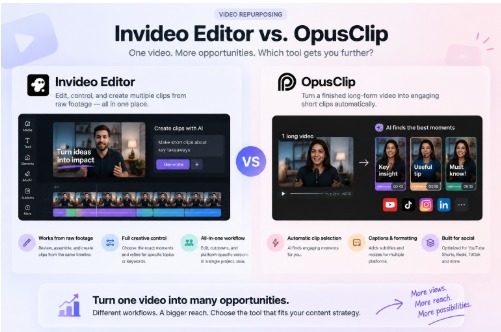
Opus Clip is built around turning long-form video into shorter social clips automatically, surfacing segments it identifies as engaging from a finished long-form upload.
Speed from raw footage to publishable video: Fast for generating short-form clips from an already finished long-form video, but it is not built to assemble the long-form video itself. It works downstream of a finished upload rather than replacing the editing process that gets you there.
Strengths: genuinely effective at repurposing an already edited long-form video into multiple short clips.
Limitations: does not address the raw footage to finished long-form video step this comparison is actually about, since it requires a completed video as its starting point.
CapCut
CapCut offers a large library of templates, effects, and auto-captioning and is widely used for both short- and long-form editing, particularly by creators comfortable working with a manual timeline.
Speed from raw footage to publishable video: Fast for a creator who already knows what they want and can navigate the timeline manually, but it does not automatically review or assemble a rough cut from raw footage the way an assembly-focused tool does.
Strengths: genuinely accessible, with strong mobile support and a large effects library.
Limitations: requires manually locating and arranging the usable sections of long-form footage, since there is no direction-based assembly step built in.
Comparing all five
| Tool | Automates footage review | Handles unscripted footage | Output stays editable. |
| Invideo Editor | Yes, full assembly from direction | Yes | Yes, full timeline |
| Descript | Yes, via transcript | Limited, best for spoken content | Yes |
| Gling | Yes, filler and silence removal only | Yes, for cleanup stage | Yes |
| Opus Clip | No, works from a finished video | Not applicable | Limited, clip focused |
| CapCut | No, manual timeline work | Yes, but manually | Yes |
Which tool actually fits a content operation
For a team publishing long-form YouTube content regularly, especially from unscripted or lightly scripted raw footage, the biggest time cost sits in the review and assembly stage, not the final polish. Tools that automate that specific stage save the most time overall.
Descript suits teams working from mostly spoken, scripted content. Gling is useful as a cleanup step ahead of a manual edit. Opus Clip is strongest downstream, turning an already finished long-form video into short clips. CapCut works well once the structure is already known and the remaining task is manual assembly and polish.
For getting from raw, unedited footage to a publishable long-form video without that manual review stage eating the bulk of the time, Invideo Editor is built specifically around that part of the workflow.
Frequently Asked Questions
Which of these tools is fastest for turning raw, unscripted footage into a long-form video?
Invideo editor generally has the shortest path from raw footage to a publishable cut, since describing the intended video replaces manually reviewing the full recording first.
Do these tools work well together in the same workflow?
Yes, in many content operations. A team might use Invideo Editor or Gling for the initial assembly and cleanup, then Opus Clip afterward to generate short clips from the finished long-form video.
Which tool is best suited to scripted podcast-style content specifically?
Descript tends to work particularly well here, since transcript-based editing fits naturally with heavily spoken, scripted material.
Can an automated first cut be adjusted manually afterward?
Yes, across most of these tools. With Invideo Editor specifically, the assembled cut lands on a full editable timeline, so any section can be refined by hand once the initial structure is in place.